Box Font Style – Copy & Paste Boxed Stylish Letters
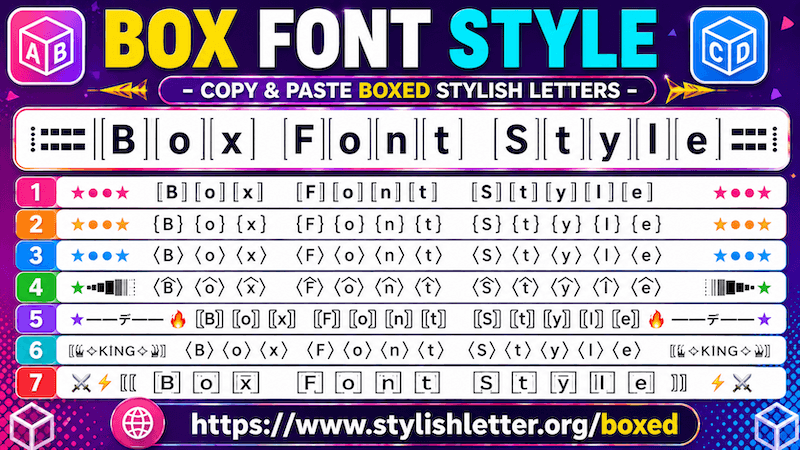
Boxed Font style is a fancy text that adds box-like symbols to your normal text. When you type your
text, it generates fancy text by adding box-style design symbols around each letter. And it is not just one type
of box style. Every fancy text style uses different box structures and symbols to
create unique designs. Each letter can appear with a different boxed effect.
Because the structure looks like boxes, it is called boxed fancy text.
Here you will find more than 100+ boxed fancy text styles.
How to Copy and Paste Box Text Font Styles?
It is really easy to do. First, you have to click on the input bar and write your message, nickname, name, or
anything you want to write. Once you write it, this will automatically generate boxed fancy font text for you.
Now simply click on any style that you like. As you click it, you will see a "copied" notification. That means
your text has been copied successfully.
Now you can paste and share it anywhere you want.
How to Load More Box Font Styles?
It is easy to do. By default, you will first see 10 default boxed fancy font text styles. These are simple boxed
text
styles.
If you scroll down, you will also find decorative boxed text styles. These are slightly different because they
include emojis, symbols, text art, and Japanese-style emoticons (kaomojis).
If you want more box font styles, simply click the "More Box Styles Letters" button.
Each click generates more boxed fancy text styles for you.
How to Use Decoration (Deco) Button Features?
It’s quite easy to use the decoration feature (Deco Button). Once you generate boxed fancy font text styles, you
will notice a green colored button labeled
Deco on the
right side of each font styles that is the decoration feature button.
What Deco (Decoration) Button does?
Deco button helps you to add decorative elements like symbols, emojis, kaomojis to your box fancy font text
styles.
For example, if you already like one style but want to make it look more decorative, then Deco feature helps
with
that.
When you click the Deco button, it opens a new page where your selected fancy text gets decorated.
It adds emojis, kaomojis, text art, and symbols such as flowers, hearts, demons, sun designs, bombs, fire
effects, and many more decorative styles.
Decoration Options You Can Choose From It
Here, you will find different categories inside the Select Option section.
For example:
- Kawaii Flourish – adds Japanese-style emojis and decorations.
- Cute Flourish – decorates your text with cute symbols, emojis, and text art.
- Gamer Flourish – adds gaming-inspired decorations such as swords, fire effects, bombs, and
similar symbols.
And there are even more categories available for different decoration styles.
You will also find a regenerate button inside each section. When you click it, it refreshes and generates new
decoration designs. Click again to load more options.
This gives you many styles to choose from. If you want to copy one, simply click on it and it will be copied
automatically.