
Stylish Letters
0 chars

Fancy Numbers - 𝟘𝟙𝟚𝟛𝟜𝟝𝟞𝟟𝟠𝟡

  • ➀➁➂➃➄➅➆➇➈⓪

    Numbers 10 chars
  • 68ㄥ9ގㄣƐᄅ⇂0

    Flip Numbers 10 chars
  • 0ƖᄅƐㄣϛ9ㄥ86

    Mirror Flip Numbers 10 chars
  • 0҉1҉2҉3҉4҉5҉6҉7҉8҉9҉

    Numbers 20 chars
  • 0̵1̷2̴3̶4̶5̵6̸7̴8̴9̴

    Numbers 20 chars
  • 0̴̳͠1̴̳͠2̴̳͠3̴̳͠4̴̳͠5̴̳͠6̴̳͠7̴̳͠8̴̳͠9̴̳͠

    Heavy Glitch Numbers 40 chars
  • 0̡̘̥́̅́1̧̛̞̋̑͜2̡̮͊̈͋ͅ3̡̪̦̂͗̀4̠̥̣̀̿̉5̞͉̟̋̿̚6̱͙̥͋͋̒7̻̦͔͂̅̍8͓̣̏̐͛ͅ9̭̘̑͒͝ͅ

    Maximum Numbers 70 chars
  • 0̷̶̻1̻͎̻2҉͎͕3̷͎͓4̷̺҉5͕͎҉6̷͓̹7͕̼҉8̴͎҉9̴͓͕

    Ugly Zalgo Numbers 40 chars
  • ⓿❶❷❸❹❺❻❼❽❾

    Round Black Numbers 10 chars
  • ⓪①②③④⑤⑥⑦⑧⑨

    Round Border Numbers 10 chars
  • ⊘𝟙ϩӠ५ƼϬ7𝟠९

    Super Script Numbers 10 chars

Decorate Stylish Letters

  • ╔ 𝟎𝟏𝟐𝟑𝟒𝟓𝟔𝟕𝟖𝟗 ╝

    Numbers • 24 chars chars
  • 💗💞 0123456789 💞💗

    Numbers • 20 chars chars
  • ┏0123456789┛

    Numbers • 12 chars chars
  • ꧁ 0123456789 ꧂

    Numbers • 14 chars chars
  • 😈🔥 0123456789 🔥😈

    Numbers • 20 chars chars
  • ─┐ 0123456789 └─

    Numbers • 16 chars chars
Other Tools

DOB - Date Of Birth Calculator Word Counter

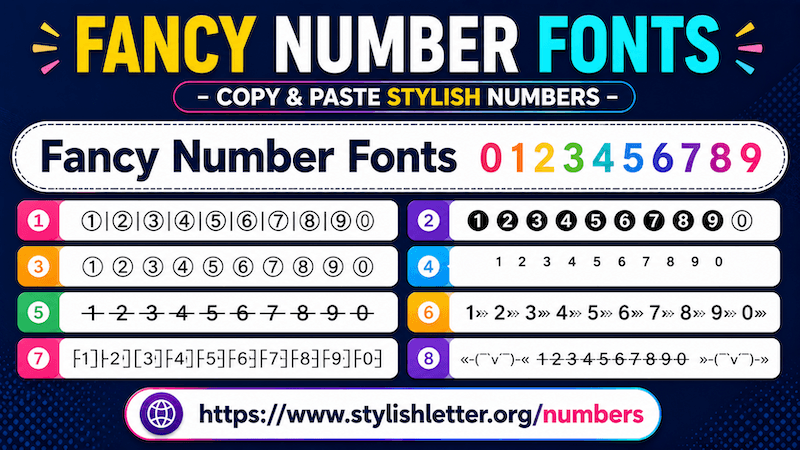
Fancy Number Fonts – Copy & Paste Stylish Fancy Numbers

Fancy Number Fonts is a fancy text style that is specially focused on numbers only.

As you may have noticed, most fancy text styles such as Boxed, Joiner, Random, Alphabet, Fantasy, Freaky, Flip Mirror, and others mainly focus on letters and transform them into different styles using symbols and decorative elements.

But this one focuses only on numbers. We understand that when people communicate, they do not use only letters they also use numbers. Sometimes when you use fancy letters but keep normal numbers, the style does not feel complete. That is why we created fancy numbers.

Here, you can generate Fancy Number Fonts and share them with friends and family the same way you use fancy text.

Fancy Number Fonts includes many of the same features available in other fancy text styles and even more specialized options for numbers.

Fancy Number Fonts – Copy & Paste Stylish Fancy Numbers

How to Use Fancy Number Fonts

It is quite easy to use. First, click on the input bar. There you will see the message "Only numbers 0–9". Enter any number you want.

If you are using a mobile phone, it may automatically open the numeric keypad.

As you type your numbers, it will automatically generate many fancy number styles. Now simply click any style you like. As you click it, you will see a "Copied" notification.

Now you can paste and share it anywhere.

What Kind of Fancy Number Fonts Can I Generate Here?

You can generate many different types of fancy numbers fonts here.

Similar to alphabet fancy text categories, number styles also come in different designs.

These are some of the unique categories available inside Fancy Number Fonts.

How Can We Decorate Fancy Number Fonts?

It is really easy to decorate your fancy number fonts with additional symbols and decorative elements. First: Generate your fancy number fonts.

Then click the green Deco button beside the style you want.

As you click it, a new page opens where your fancy numbers are decorated with additional symbols, emojis, and Japanese style emojis (kaomojis). You may also find decorative themes with flowers, gaming-style elements, and many other styles.

To copy any style, simply click it. As you click it, it will copy your fancy numbers.

You will also find a regenerate it button at the bottom. Clicking it refreshes and generates new decorated styles.

If you want more specific decoration styles, open Select Option.

If you want to copy a design, simply click it and it will be copied automatically.

How to Make Fancy Numbers Look Bigger and Smaller

It is quite easy. Below the input bar, you will find a font-size slider.

Move the slider to the right to make the preview bigger.

Move it to the left to make it smaller.

Remember that this feature is only for preview purposes.

The actual font size depends on the device font settings of the person viewing it.